


Description
n8n-nodes-engram
Knowledge graph memory for n8n AI agents
Persistent memory with entity extraction, temporal fact tracking, community detection, graph traversal, and hybrid search.


Installation ·
Upgrade ·
Nodes ·
Storage ·
Extraction ·
Search ·
Security ·
Development
—
> Note: This is a community node. It is not officially supported by n8n. Use at your own discretion.
—
Overview
Engram gives your n8n AI agents a knowledge graph memory. Instead of losing context between conversations, agents build and query a persistent graph of entities (people, organizations, concepts) and the relationships between them.
Every conversation is stored as an episode. An optional LLM extraction pipeline identifies entities and facts from dialogue, building a growing knowledge graph. When the agent receives a new message, Engram searches the graph for relevant facts and injects them as context—giving the agent long-term memory that goes beyond simple chat history.
Highlights
| | Feature | Description |
| ——- | —————– | ——————————————————– |
| 4 | n8n Nodes | Memory, Explorer, Admin, Trigger |
| 2 | Storage Backends | Embedded (zero-setup) or Neo4j (production) |
| 5 | Extraction Stages | Entity, dedup, relationships, contradictions, embeddings |
| 3 | Search Modes | Full-text, vector, hybrid RRF fusion |
| 350 | Tests | Unit + integration across 35 test suites |
—
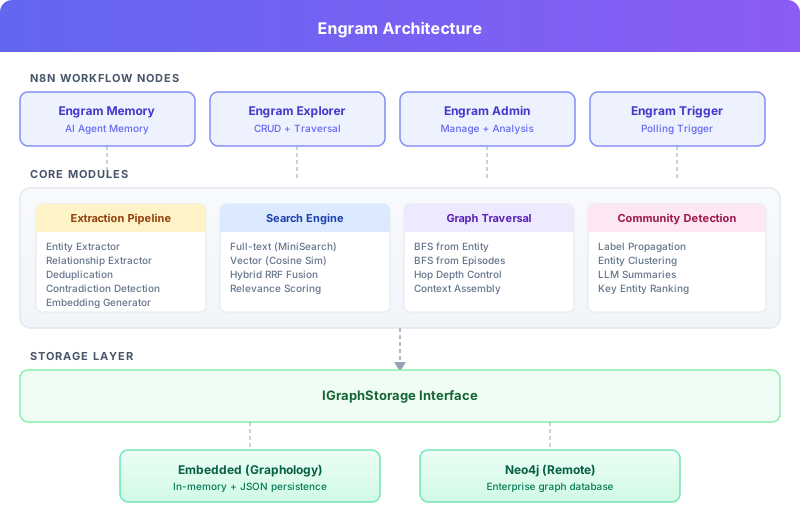
Architecture
—
Product Screenshots
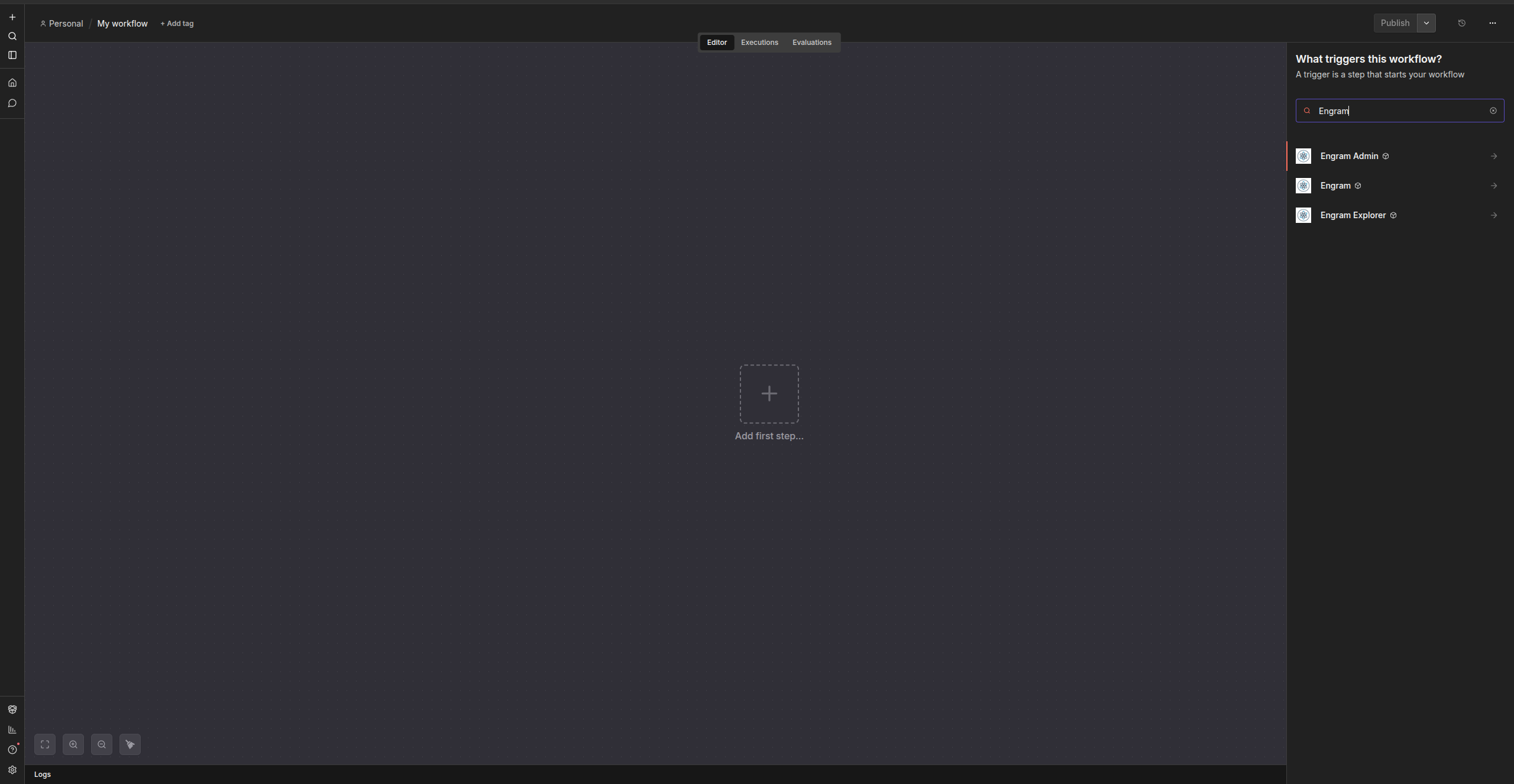
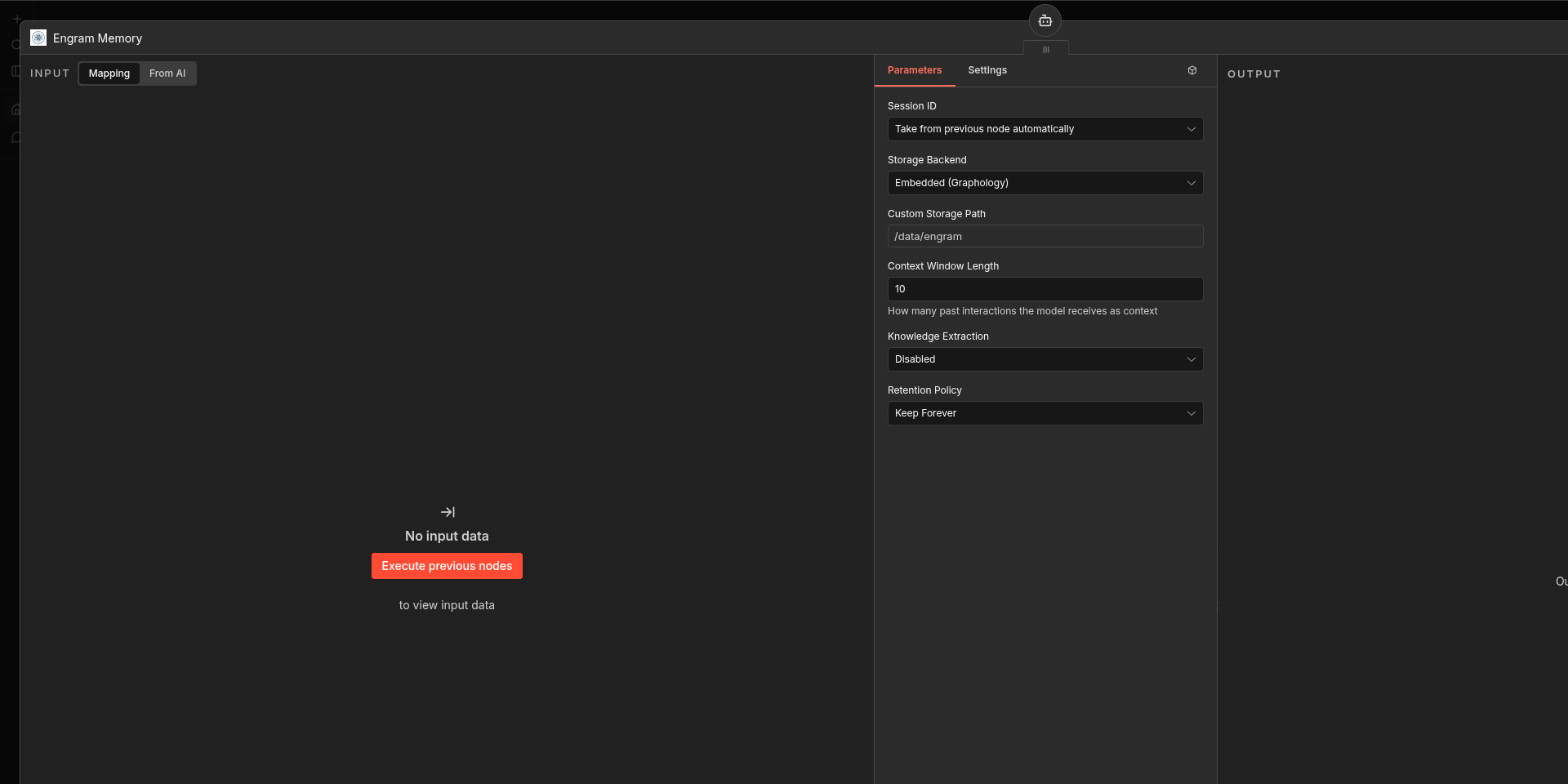
Engram provides dedicated n8n nodes for AI memory, graph exploration, administration, diagnostics, and event-driven workflows.
| Installed nodes | AI Memory node |
| —————————————————————————————— | ———————————————————————————— |
|  |
 |
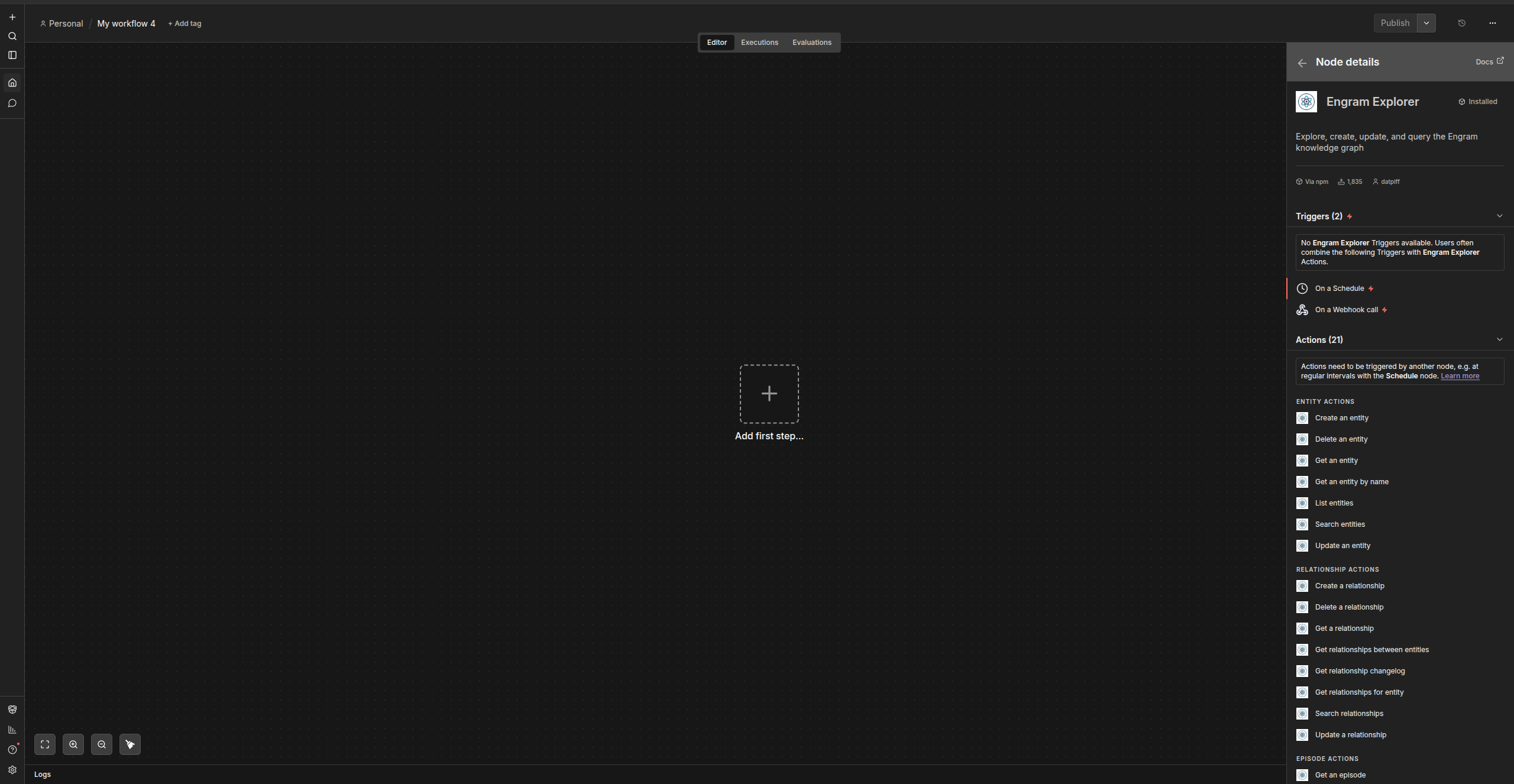
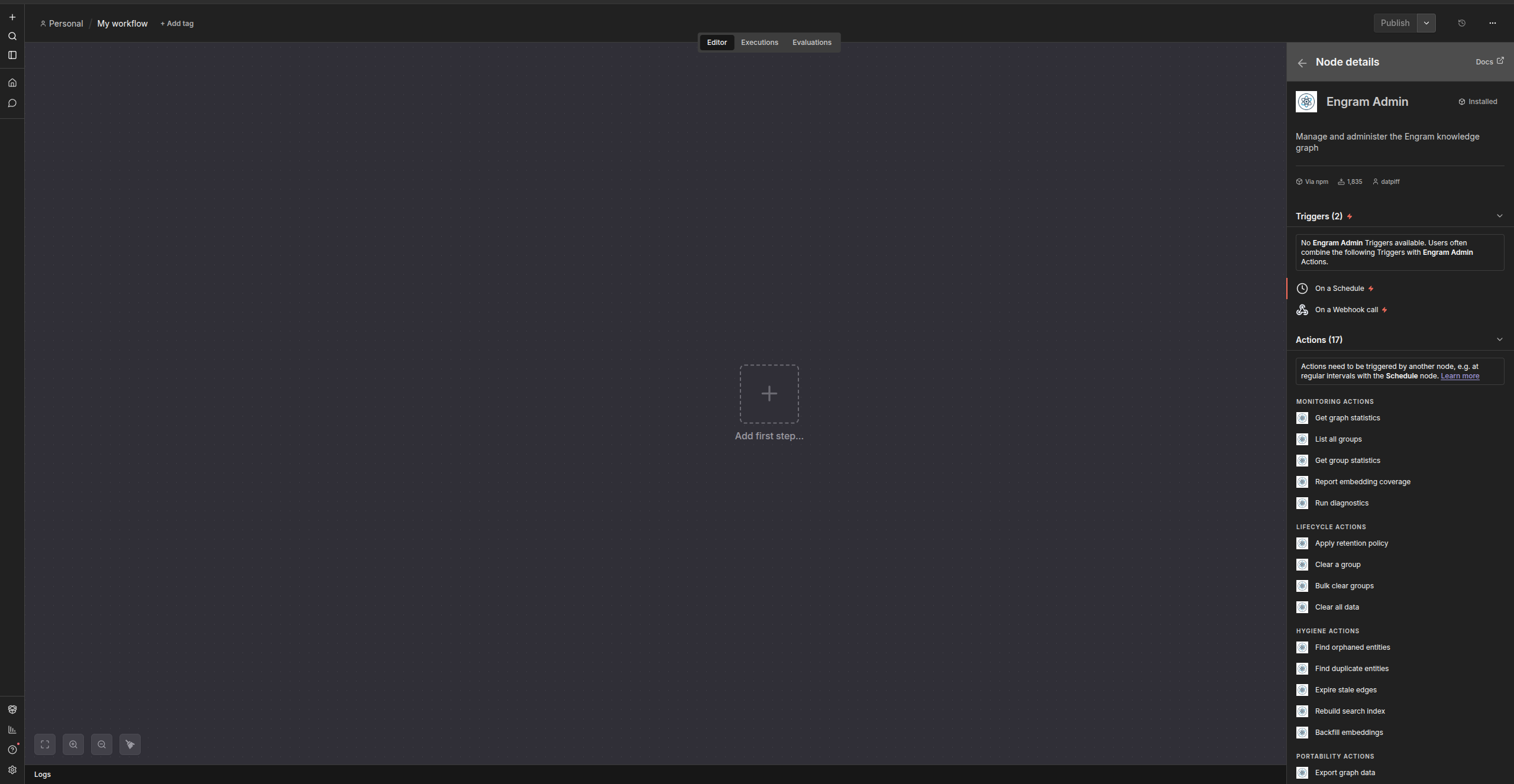
| Explorer actions | Admin operations |
| —————————————————————————————— | ———————————————————————————————————– |
|  |
 |
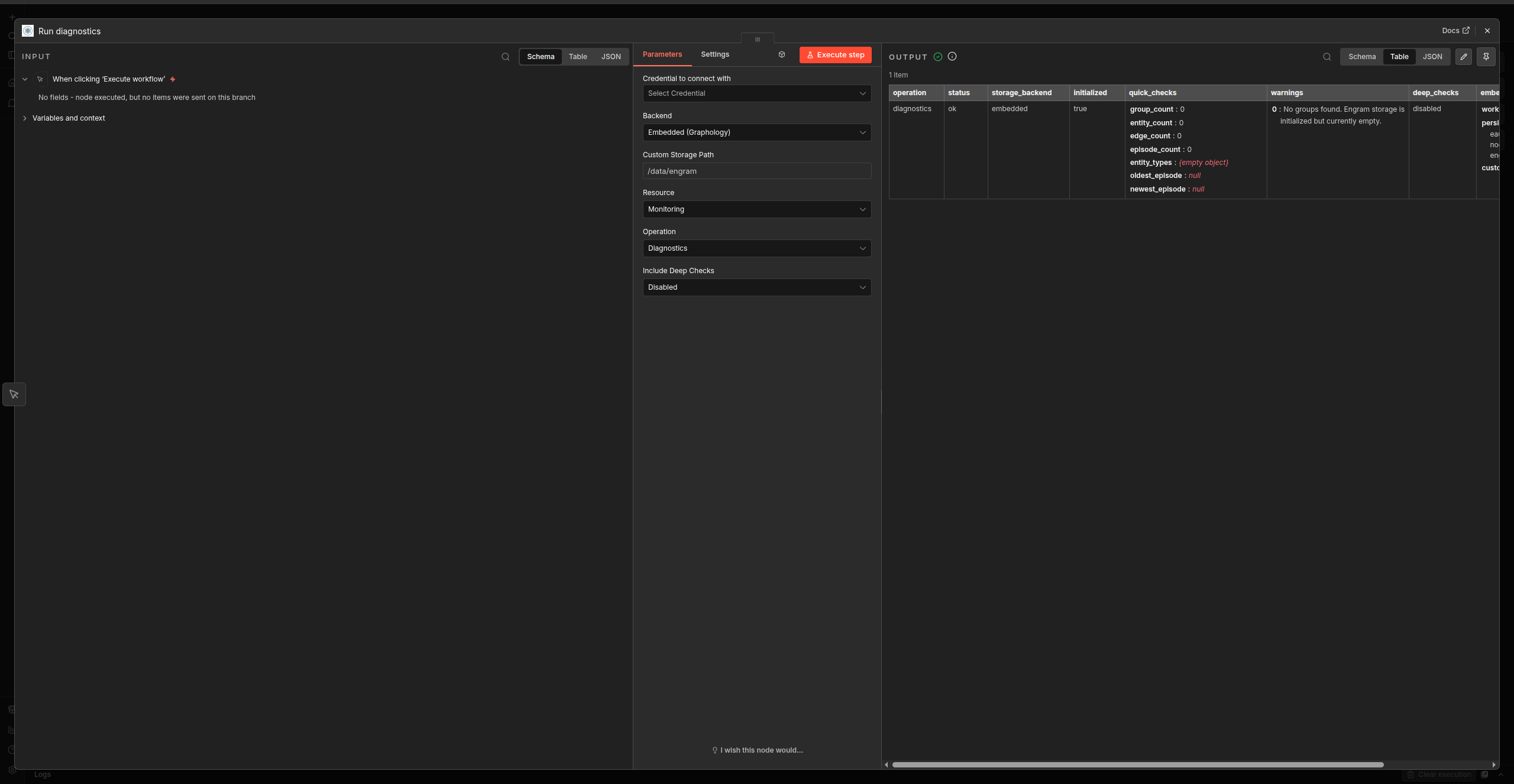
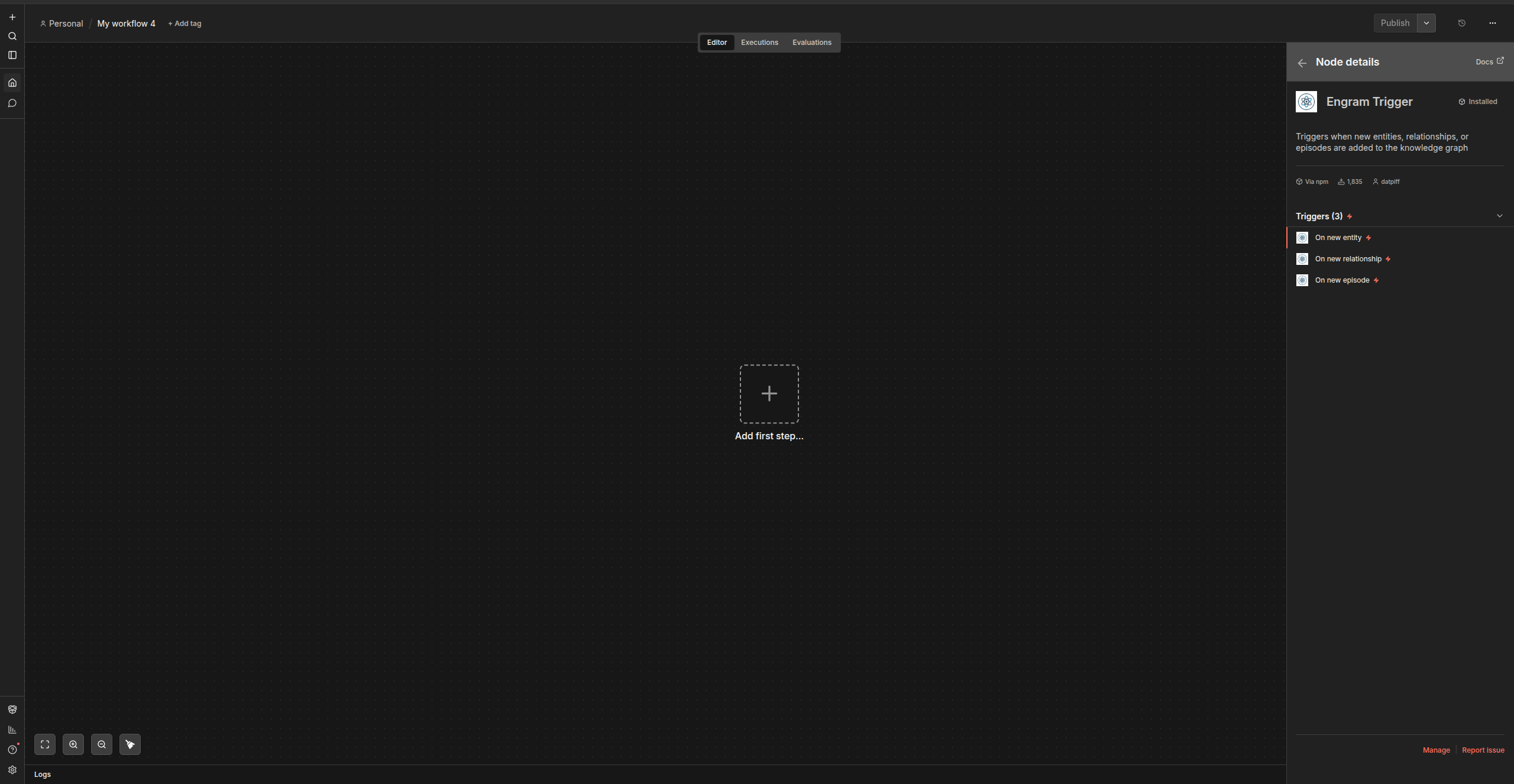
| Admin diagnostics output | Graph event trigger |
| ————————————————————————————————— | ———————————————————————————— |
|  |
 |
—
Installation
Via n8n Community Nodes
1. Go to Settings > Community Nodes in your n8n instance
2. Enter n8n-nodes-engram
3. Click Install
Manual
cd ~/.n8n
npm install n8n-nodes-engram
—
Upgrading to v0.8.6
This patch reduces repeated embedded-storage validation work during native automatic capture. Existing node versions, memory policies, models and saved defaults are unchanged. No new setting, memory reset, re-enrollment or re-extraction is required. Actual response times depend on the store, runtime and provider.
1. Take fresh, consistent workflow and backend-native backups: complete embedded files or a Neo4j database backup. Preserve producer/storage mapping, logical store identity, namespaces, bindings and aliases.
2. Install [email protected], restart n8n and refresh the editor. Start with an inactive workflow copy and a separately restored store whose logical ownership mapping is preserved.
3. Verify normal and tool-assisted turns, accepted graph recall with the source absent from recent history, duplicate-event suppression and final-turn persistence before expanding the rollout. Optional native diagnostics remain disabled by default.
See the migration guide for earlier upgrade steps, first-time profile activation, diagnostics and storage compatibility restrictions. Keep all existing forward-only and mixed-version restrictions. Prefer reverting explicit policy settings on a supported binary; never restore an old snapshot over newer conversations or discard autonomous metadata to downgrade.
Quick Start
Minimal Setup (No LLM Required)
1. Add an Engram Memory node to your AI Agent workflow
2. Connect it to the agent’s Memory input
3. Set Storage Backend to Embedded (Graphology)
4. Leave Knowledge Extraction as Disabled
Your agent now has persistent conversation history stored as episodic memory.
Full Setup (With Extraction)
1. Create an Engram Extraction LLM credential:
– Base URL: OpenAI-compatible endpoint (e.g. https://api.openai.com/v1)
– API Key: Your API key
2. Add an Engram Memory node, enable Knowledge Extraction
3. Select an extraction model (e.g. gpt-4o-mini)
4. Optionally enable Semantic Search (Embeddings) with an embedding model
5. Optionally enable Graph Traversal (BFS) for context enrichment
The extraction pipeline automatically identifies entities and relationships from conversations and builds a queryable knowledge graph.
—
Node Reference
Engram Memory
> AI Memory node—connects to the AI Agent memory input.
On each conversation turn, Engram Memory:
- Loads relevant facts from the knowledge graph as system context, plus recent chat history
- Saves messages as episodes, optionally running the full extraction pipeline
- Select History Filter > Provenance to exclude tool-output, monitor-summary, and audit episodes from conversation context.
- Select Provenance and Reviewed Legacy to additionally exclude an exact reviewed legacy artifact pair: an empty assistant
[]immediately chained to an unlabelled legacy human array of response/error objects. The human payload must match a configured Reviewed Legacy Content Hash, and source/chain checks must agree. Without that approval, ambiguous JSON remains. Genuine human JSON, quoted messages, and graph fact SystemMessages are retained. - Reviewed Legacy Content Hashes accepts up to 100 comma-separated lowercase SHA256 hashes of exact UTF-8 episode content, including its whitespace. Review the original episodes before supplying hashes. Filtering changes only the context read; it does not delete records, rewrite chains, or remove graph facts.
| Setting | Description | Default |
| ————————— | ——————————————————— | ———— |
| Storage Backend | Embedded (Graphology) or Neo4j | Embedded |
| Knowledge Extraction | LLM-powered entity extraction | Disabled |
| Extraction Temperature Mode | Legacy (0), Provider Default (omit), or Custom | Legacy (0) |
| Store Human Episodes | Persist human messages as episodes (v2) | Enabled |
| Human Episode Kind | Classify human input as active or passive provenance (v2) | Active Human |
| Store AI Episodes | Persist assistant replies as episodes (v2) | Enabled |
| Extract from Human Messages | Allow human content to produce facts (v2) | Enabled |
| Extract from AI Messages | Allow assistant content to produce facts (v2) | Disabled |
| Semantic Search | Vector embeddings for hybrid search | Disabled |
| Graph Traversal | BFS enrichment from matched entities | Disabled |
| Context Window | Recent messages/episodes to include | 10 |
| Max Facts per Query | Facts injected as context | 10 |
| Min Relevance Score | Threshold for inclusion (0–1) | 0.5 |
| Retention Policy | Episode lifecycle management | Forever |
Existing saved Engram Memory nodes retain their original node version and behavior when the package is upgraded. Use n8n’s node upgrade action on a workflow copy to adopt v2 controls. Passive ingestion workflows should select Human Episode Kind > Passive Human, while direct agent conversations should keep the default Active Human classification.
History Filtering and Final-Turn Writes (Memory v2)
These controls are opt-in. Existing saved settings keep History Filter > Off and Message Write Policy > Legacy. Upgrade a v1 Memory node through n8n’s node upgrade action on a workflow copy before adopting the v2 controls. Session keys and existing episodes are preserved.
The context window counts eligible messages. Engram captures one bounded recent-episode snapshot and scans it in local pages of 100, refilling from older eligible messages. Maximum History Scan defaults to 1000 and is capped at 10000; one extra prefetched episode supports boundary evidence and overflow detection. This is bounded snapshot prefetch with local paging, not backend cursor pagination. Load diagnostics show fetched, examined, pages, exclusion counts, and returned. snapshotoverflow means more history existed than the scan allowance; scantruncated means that allowance prevented filling the window. No new appends are fetched during the scan.
Select Message Write Policy > Final Turns to apply the same storage, extraction, and provenance controls when n8n saves a normal turn or calls the native bulk-message tool-save path. Engram retains real human input and the final assistant reply after identified tool calls have closed. Native tool/function messages and intermediate assistant tool calls are classified distinctly and never become human input. Store Tool Audit optionally retains those messages as unverified tool-output episodes; they stay outside conversation context even with History Filter set to Off. Tool extraction remains a separate explicit control and is disabled by default.
Set a stable per-turn Idempotency Key or human Source Message ID to deduplicate retries across both write paths. Final-role keys are independent of intermediate tool count. Repeated identical turns without an explicit identity remain distinct. Existing stored sources are not re-extracted on an ordinary duplicate write; persistence followed by extraction is not a transactional exactly-once guarantee. If storage is disabled, extraction uses transient sources and has no durable retry ledger. Native bulk-save diagnostics report confirmed writes, duplicates, audits, skipped messages, and the extraction outcome.
Current Query for Empty Memory Loads
Some n8n agent versions call memory loading with empty values. Configure Current Human Query to the same current-message expression used by the agent prompt. Its default reads string chatInput, then string input, and otherwise leaves the query empty. Explicit input passed by the agent takes precedence. Engram does not infer a current query from old history.
The expression is resolved in n8n’s subnode item context when memory is supplied. Subnode expression behavior can differ from regular-node per-item evaluation; process independent conversations separately and validate mappings in your workflow. Load diagnostics expose retrieval.query_source (input, configured, or none), query availability, and the number of graph fact context messages without including query text. If no current query is available, history still loads but graph search is not attempted. Validate graph recall with a known older accepted fact beyond the recent-message window.
Engram Explorer
> Regular node—CRUD operations on the knowledge graph.
| Resource | Operations |
| —————- | ————————————————————————————— |
| Entity | Create, Get, Get by Name, List, Search, Update, Delete |
| Relationship | Create, Get, Get Between, Get for Entity, Search, Review, Update, Delete, Get Changelog |
| Episode | Get, Get Recent, Get by Date Range, Get Count, List, Update, Delete |
| Traversal | BFS from Entity, BFS from Episodes |
Engram Admin
> Regular node—administration and analysis.
| Resource | Operations |
| ————— | —————————————————————————————————- |
| Monitoring | Stats, List Groups, Group Stats, Embedding Coverage, Diagnostics |
| Lifecycle | Apply Retention, Purge Episodes, Migrate Storage Schema, Clear Group, Bulk Clear Groups, Clear All |
| Hygiene | Orphaned Entities, Duplicate Entities, Expire Stale Edges, Rebuild Search Index, Backfill Embeddings |
| Portability | Export, Import |
| Analysis | Detect Communities |
Engram Trigger
> Polling trigger—fires when new entities, relationships, or episodes appear in the graph.
Operational Diagnostics
Engram Admin includes a read-only Monitoring > Diagnostics operation for production checks. By default it returns quick storage and graph counts only. Optional deep checks scan the full graph to report embedding coverage, expired/invalidated edges, dangling edges, and duplicate entity-name groups.
For embedded storage, diagnostics also report the most recent mutation’s queue wait, file-lock wait, disk refresh, rollback export, graph mutation, snapshot write, rollback restore, total duration, and snapshot size. These timings help distinguish lock contention from large-snapshot persistence costs.
Use Monitoring > Embedding Coverage to check whether entities and facts have vectors before enabling hybrid search broadly. Use Hygiene > Rebuild Search Index to rebuild the embedded full-text index from stored graph data. Use Hygiene > Backfill Embeddings in dry-run mode first, then disable dry-run to fill missing embeddings with the configured embedding model.
Explorer entity and relationship searches can optionally return retrieval diagnostics. The aggregate trace shows active filters, bounded candidate scores and decisions, rejection reasons, and which complete items fit the context preview budget. Diagnostics are disabled by default.
Import, Export, and Backups
Engram exports use graph format 2.0 and include count metadata and a SHA-256 checksum. Imports support Dry Run mode, optional maximum item limits, checksum verification before migration, migration reporting, and reference-integrity warnings before writing data. Existing 1.0 backups remain importable; episodes without provenance are classified as legacy, unverified, and proposed rather than being accepted automatically.
Embedded storage upgrades automatically before the graph is opened. Engram creates and verifies an owner-readable backup beside the storage file, writes the migrated graph with atomic replacement, and stops without changing the source if backup verification or migration fails. The backup name ends with .pre-schema-2.0.backup.json, and Monitoring > Diagnostics reports its path and verification state.
Neo4j remains available during an upgrade and does not perform an unbounded startup rewrite. Use Lifecycle > Migrate Storage Schema in Dry Run mode to inspect the remaining legacy episode count, then apply confirmed bounded batches until the remaining count reaches zero. The migration is additive: it only fills missing governance fields with conservative legacy defaults.
For a staged restore, first run the import in Dry Run mode and review the source/target versions, default counts, and warnings. Keep the original export unchanged, then perform the write import only after the report matches expectations. Export the restored graph again to create a checksummed 2.0 backup.
To remove historical monitor or tool pollution, use Explorer episode filters to inspect the affected source, kind, trust level, or date range. Admin Lifecycle > Purge Episodes can also match empty assistant output or a case-insensitive content fragment. Always run the bounded purge in dry-run mode and review the matched episodes before confirming deletion.
For production Neo4j deployments, see docs/production-neo4j.md. Ready-to-import starter workflows are available in docs/workflows/.
—
Storage Backends
| | Embedded (Graphology) | Neo4j |
| —————– | —————————– | —————————– |
| Setup | Zero configuration | Requires Neo4j instance |
| Persistence | JSON file on disk | Neo4j database |
| Vector search | Brute-force cosine similarity | Brute-force cosine similarity |
| Best for | Development, single-instance | Production, multi-instance |
| Scaling | Single n8n instance | Independent of n8n lifecycle |
Both backends implement the same IGraphStorage interface. All features work identically on either backend.
—
Knowledge Extraction
When enabled, the extraction pipeline processes each conversation turn:
User message + AI response
        |
   Entity Extractor ── identifies people, orgs, locations, concepts
        |
   Entity Deduplicator ── merges "Bob Smith" with "Bob"
        |
   Relationship Extractor ── extracts facts ("Alice works at Acme")
        |
   Contradiction Detector ── flags conflicting facts
        |
   Embedding Generator ── (optional) vectors for semantic search
Supported providers: Any OpenAI-compatible API—OpenAI, OpenRouter, Ollama, LM Studio, Together AI, and others.
Configurable entity types: person, organization, location, concept, event, or custom types.
Extracted entities and relationships include attributes.engram_extraction provenance metadata with source, extraction timestamp, confidence placeholder, review status, and related episode UUIDs where available.
Extraction Model Compatibility
Extraction Temperature Mode applies to every extraction stage in Engram Memory v1 and v2:
0 and preserves existing workflow behavior.Upgrading the package alone retains Legacy (0). To resolve an unsupported-temperature error, select Provider Default explicitly in the affected Memory node and validate the workflow before activating it. No storage migration or Memory node-version upgrade is required for these settings. Engram does not automatically change models or retry rejected requests with guessed settings. Extraction still uses Chat Completions JSON-object mode; confirm that your provider and model support it.
Extraction Outcomes
In an execution, open the Engram Memory save output and inspect extraction. Conversation history saves before extraction, so an overall successful conversation can still have a failed extraction outcome.
| Status | Meaning |
| ———– | ————————————————————————————————————————- |
| disabled | Knowledge extraction is disabled. |
| skipped | No eligible, nonempty source messages were selected. |
| succeeded | Attempted stages completed; finding zero entities is also successful. |
| partial | An optional stage failed, malformed records were excluded, or a required stage failed after some graph changes succeeded. |
| failed | A required stage failed before any graph changes succeeded, or extraction configuration is missing. |
Outcomes include duration, stage status, confirmed mutation counts, filtered/malformed record counts, and bounded error classifications such as unsupportedparameter, authentication, ratelimit, and timeout. Update counts include metadata-only updates; edge expirations are counted separately. Partial extraction does not roll back completed graph changes. Provider error bodies and message content are excluded from extraction error diagnostics; normal n8n conversation previews still contain message content.
Extraction outcomes belong to their execution’s save output. Engram Admin storage diagnostics do not provide a persistent extraction event history. A failed history preview is reported separately from the completed save. The context window counts messages, not user turns or days; graph recall operates independently of that window.
—
Search
| Mode | Description | Requirements |
| ————– | ———————————————- | —————— |
| Full-text | Keyword search on names, summaries, and facts | None |
| Vector | Cosine similarity on embedding vectors | Embeddings enabled |
| Hybrid RRF | Reciprocal Rank Fusion combining text + vector | Embeddings enabled |
Hybrid search automatically activates when both text and vector search are available.
All search operations support optional temporal filters (validafter, validbefore, createdafter, createdbefore) to scope results by time.
—
Temporal Queries
Engram tracks when facts are valid (validat, invalidat) and when they were superseded (expired_at). You can query the graph by time:
| Operation | Node | Description |
| —————————- | ————————————- | —————————————————————————— |
| Get by Date Range | Explorer > Episode | Retrieve episodes within a time window by reference_time |
| Get Changelog | Explorer > Relationship | Get recently created, expired, or invalidated relationships since a given date |
| Search with date filters | Explorer > Entity/Relationship Search | Filter search results by validafter, validbefore, or created_after |
Date parameters use ISO 8601 format (e.g. 2026-01-15T00:00:00.000Z). The LLM agent can convert natural language like “last week” into concrete dates before calling these operations.
—
Community Detection
Clusters related entities using label propagation. Communities are computed on demand via Engram Admin > Detect Communities and include member entities, key entities ranked by connectivity, and optional LLM-generated summaries.
—
Graph Traversal
BFS (breadth-first search) walks the knowledge graph outward from seed entities, collecting connected entities and relationships within a configurable hop limit.
—
Data Storage & Security
Engram stores conversation data and extracted knowledge. You should understand where this data lives before deploying to production.
Embedded backend:
~/.n8n/storage/n8n-nodes-engram/{workflowId}-engram.json by defaultNeo4j backend:
LLM API calls:
General:
—
Credentials
Engram Extraction LLM
| Field | Description |
| ——– | —————————— |
| Base URL | OpenAI-compatible API base URL |
| API Key | API key for the LLM provider |
Used for entity extraction, community summaries, and embedding generation.
Engram Neo4j Connection
| Field | Description |
| ——– | ————————————————— |
| URI | Neo4j connection URI (e.g. bolt://localhost:7687) |
| Username | Neo4j username |
| Password | Neo4j password |
| Database | Database name (default: neo4j) |
Required only with the Neo4j storage backend.
—
Development
Prerequisites
Setup
git clone https://github.com/casistack/n8n-nodes-engram.git
cd n8n-nodes-engram
npm install
Commands
| Command | Description |
| ———————– | ———————————– |
| npm run build | TypeScript compilation + icon build |
| npm run lint | ESLint |
| npm run format | Prettier (write) |
| npm run format:check | Prettier (check) |
| npm run type-check | TypeScript type checking |
| npm test | Run all tests |
| npm run test:coverage | Coverage report |
Git Hooks (Husky)
| Hook | Checks |
| ———— | ————————————— |
| pre-commit | ESLint, Prettier, TypeScript type-check |
| pre-push | Build, full test suite |
CI/CD
—
Support
If you find Engram useful, consider supporting the project:

—




