Description
n8n-nodes-stocklake
Stock market data in n8n, and a trigger that starts a workflow when something happens.
Stocklake covers 3,500+ stocks and ETFs in the US, Europe and Asia: prices (delayed about 15 minutes), fundamentals, technical indicators, insider trades, SEC filings, earnings, news and macro data, plus Pro research and trade signals. This package adds two nodes to n8n:
- Stocklake — 25 operations in 9 resources. Lists come back as one item per row, so they go straight into Filter, Sort, Split In Batches or a spreadsheet. Three operations (Compare, Snapshot, Check Holdings) combine several calls and shape the result inside n8n. It also works as a tool for an AI agent.
- Stocklake Trigger — a polling trigger with six events (a new signal, earnings coming up, a new SEC filing, an insider purchase, an RSI crossing, a price move). Each event fires once.
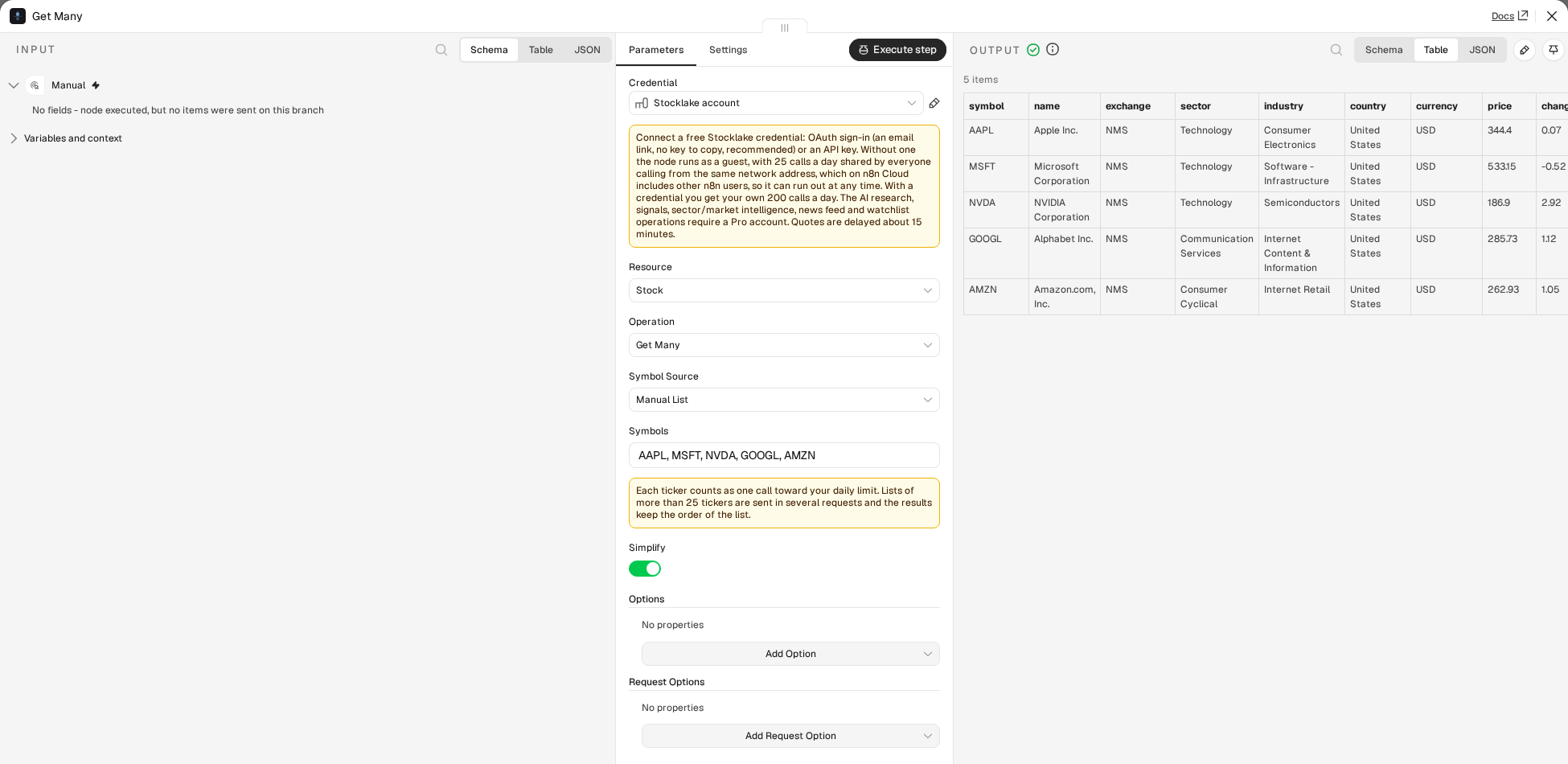
!The Stocklake node: Stock, Get Many, five stocks as a table
Stocklake has a free tier and a no-key guest mode. The free operations work without signing up, but on n8n Cloud you should connect a free credential (see Credentials). AI research, signals, sector and market intelligence, the news feed and the watchlist need a Pro account.
Contents: Installation · Credentials · Operations · Output · Combined operations · Stocklake Trigger · AI agents · Templates · Limits and errors · Upgrading from 0.1.x
Installation
Follow n8n’s guide to install a community node in your n8n instance and enter:
n8n-nodes-stocklake
Credentials
On n8n Cloud, connect a credential. Without one, the node runs as a guest, and guest calls are limited to 25 a day per network address. n8n Cloud sends many customers’ requests from shared addresses, so that allowance is shared with other n8n users and can already be used up when you start. A free Stocklake account (OAuth2: sign in with an email link, nothing to copy) gives you your own 200 calls a day. If the guest limit is hit, the node’s error says so and what to do. On a self-hosted n8n the guest limit is yours alone.
Credentials are otherwise optional. Without one, the node calls Stocklake as an unauthenticated guest (25 calls a day, free operations only). Once connected, either way below, it’s 200 calls a day; a Pro account unlocks 5,000 calls a day plus the AI research operations. Current limits are on stocklake.dev/docs#rate-limits. The node’s Authentication dropdown picks between the two:
OAuth2 (recommended): add a Stocklake OAuth2 API credential and click Connect. No key to copy or paste: your browser opens, you sign in with a magic link (or you’re already signed in), and n8n handles the rest, including token refresh. Under the hood this uses n8n’s Dynamic Client Registration support against Stocklake’s own OAuth server, the same mechanism Claude and ChatGPT connectors use.
API key: go to stocklake.dev/login, enter your email, click the magic link, and your key is on the account page. Add a Stocklake API credential in n8n and paste it in. Useful if your n8n instance can’t complete a browser-based OAuth flow (some headless or CI setups).
Plans and limits
| Plan | Calls a day | Operations |
|—|—|—|
| Guest (no credential) | 25 per network address | Free operations: Stock: Get / Get Many / Compare / Snapshot / Get History / Get News / Get Insider Activity / Get Financials / Get Filings / Get Activity · Portfolio: Check Holdings · Market: Get Movers / Get Pulse / Get Economic Calendar · Earnings: Get Calendar · Screener: Screen Stocks |
| Free | 200 | Same operations as guest |
| Pro | 5,000 | All of the above (with more on some: the AI read on Get Insider Activity, five years and quarterly statements on Get Financials, summaries on Get Filings, the content of each Get Activity item, a longer Get Economic Calendar window), plus: Stock: Get Research / Get Indicator History / Get Analyst Trend · Market: Get Assessment · Sector: Get Intelligence · Earnings: Get Intelligence · News: Get Feed · Signal: Get Many · Watchlist: Get |
A Pro-only operation called without a Pro key returns a clear error explaining what’s needed. The node doesn’t hide these operations: Stocklake’s philosophy is “data is free, intelligence is Pro”, and it’s useful to see what’s available before upgrading.
Calls are counted as the API bills them: list operations (Get Many, Screen Stocks, Get Movers, Signals, Earnings Intelligence and the like) count one call per row returned, not one per request.
Resources and operations
Stocklake offers 22 tools: 13 available without Pro and 9 that need it. Version 2 of the node exposes all 25 (16 free, 9 Pro) operations in 9 resources: the 22 tools and three operations that combine several calls (Compare, Snapshot, Check Holdings). Each operation links to its reference page:
The Symbol field on single-stock operations is a Resource Locator: search by company name or ticker (“From List”, backed by Stocklake’s public autocomplete, no key needed), or type a ticker directly (“By Ticker”). With nothing typed, the list also shows your watchlist.
Node versions
The node has two versions. Version 2 is the default for new nodes. Version 1 is the node as published in 0.1.x: workflows saved with it keep running with the same parameters and the same output, and are never converted automatically. To move a node to version 2, open its settings and pick the new version. See the changelog for what 2.0.0 changes.
Output (version 2)
Version 2 behaves like a native n8n node. Operations that return a list give one item per row, so you can wire them straight into Filter, Sort, Split In Batches or a spreadsheet node without splitting a blob first:
category field), Get Economic Calendar (rows carry a bucket of released_recent or upcoming)Every other operation (Stock: Get, Get Research, Get Financials, Get Insider Activity; Market: Get Pulse, Get Assessment; Sector: Get Intelligence) returns the whole response as one item.
_meta. If a list comes back empty, that one item is still returned so the note is not lost.symbol they belong to, so rows from several input items stay distinguishable after a Merge.$('Stocklake').item work.Version 1 keeps returning the whole response as one item; its output has not changed.
Combined operations (version 2)
Three operations combine several calls and shape the result inside n8n, which the generic MCP Client node cannot do. All three are free; a Pro account adds columns or flags. Each has a ready-to-run workflow in examples/ (paste the file onto an empty canvas).
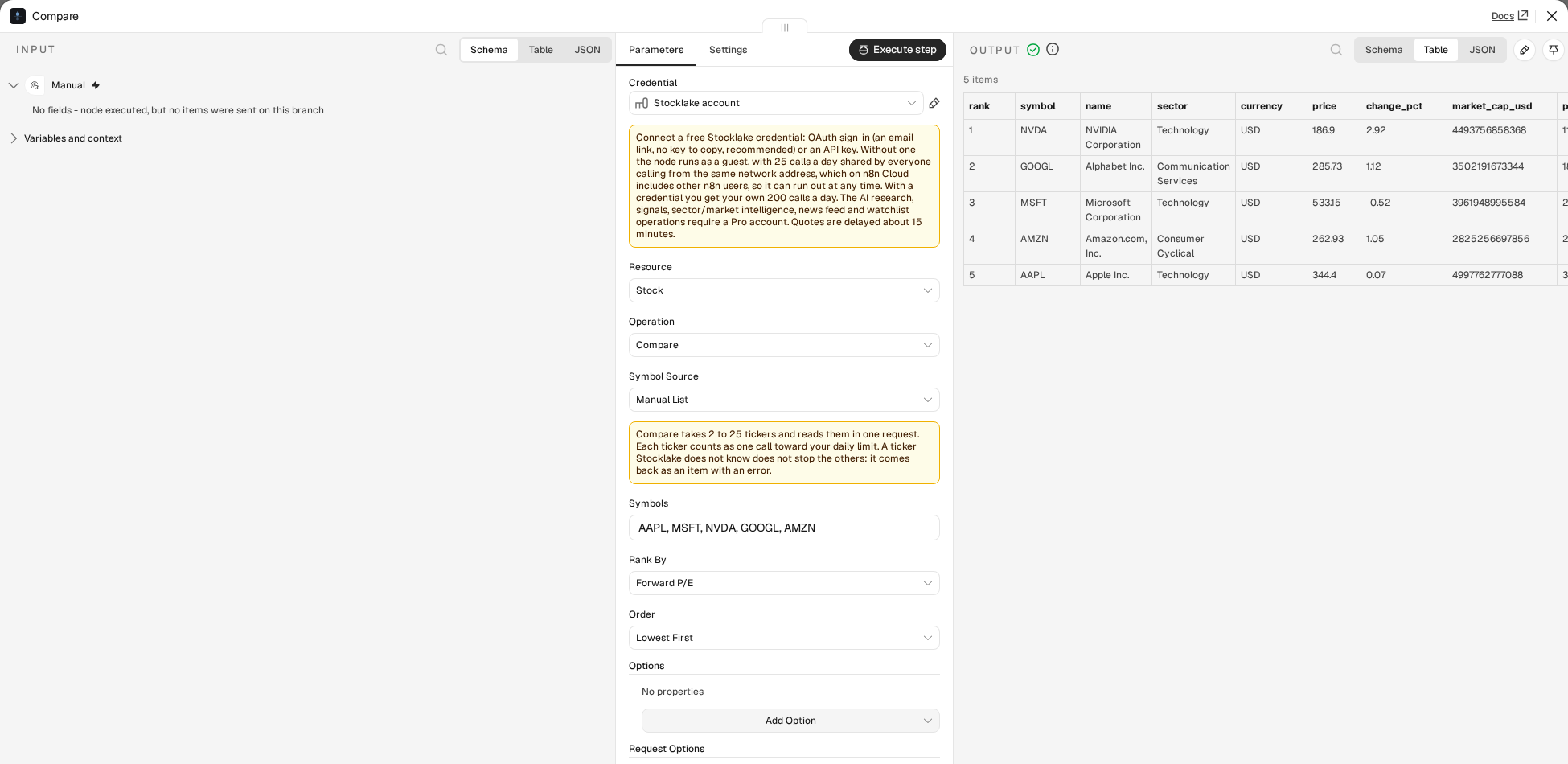
!Stock, Compare: five stocks ranked by forward P/E
Stock → Compare (example) puts 2 to 25 stocks side by side in one request. You get one item per stock with the same columns on every item: price, changepct, marketcapusd, peforward, petrailing, rsi, week52low, week52high, week52positionpct (0 at the 52-week low, 100 at the high), analystrating, analysttarget, analystupsidepct, and on Pro ratingscore, ratingdirection, aiverdict, ai_score. A value Stocklake does not have is null, not a missing key. Rank By sorts the items by a column and adds rank (1 is first; equal values share a rank; stocks without a value come last with rank: null); Order says which end comes first. The tickers come from the Symbols field, or with Symbol Source: From Input Items from all input items together.
Stock → Snapshot (example) reads one stock into one flat item for people and AI agents: the quote, rsi and rsistate, macdstate, pricevssma50 and pricevssma200, the 52-week position, the analyst view, nextearningsdate and nextearningsin_days, the latest filing’s date, title, headline and link, on Pro the rating and the AI verdict, and a summary sentence with the same facts. It makes two requests; if the filing request fails you still get the snapshot, with a notes entry saying so.
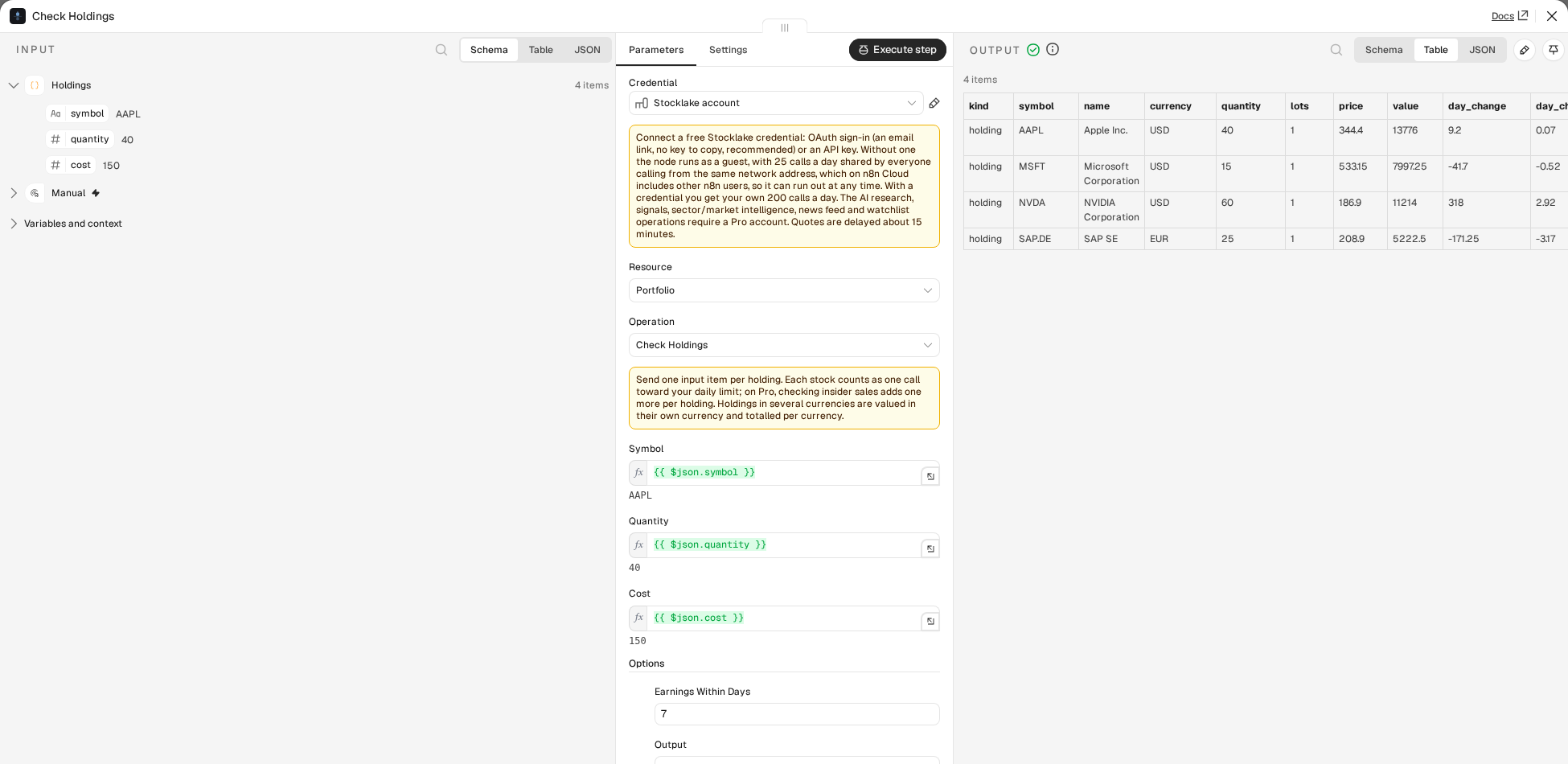
!Portfolio, Check Holdings: four holdings valued from input items
Portfolio → Check Holdings (example) takes one input item per holding. Symbol, Quantity and Cost are expressions ({{ $json.symbol }}, {{ $json.quantity }}, {{ $json.cost }} by default); Cost is optional and is the price per share unless Options → Cost Is says it is the total. Items with the same ticker are added up as lots of one holding, with the weighted average cost. Each holding comes back as an item with value, daychange, daychangepct, cost, pl, plpct, weightpct, rsi, earningsdate, earningsindays and flags:
rsioverbought / rsioversold: RSI at or above 70 / at or below 30 (change the limits in Options).earnings_soon: earnings within 7 days (Options: up to 30). The dates come from the earnings calendar; a stock the calendar does not list uses its own earnings date.largeinsidersale (Pro): insiders sold $1,000,000 or more in the last 30 days (Options: the amount, or switch the check off). It costs one call per holding; on a free account it is skipped and the output says so.One more item, kind: "summary", follows the holdings: totalvalue, daychange, daychangepct, totalcost, totalpl, topweightsymbol, topweightpct, flaggedholdings, and which holdings carry which flag. Holdings in several currencies are valued in their own currency and totalled per currency in bycurrency (there is no single total or weight without exchange rates). Options → Output returns the holdings only or the summary only.
Quotes are read 25 holdings per request, as in Get Many. One bad symbol does not sink the batch: in all three operations a ticker Stocklake does not know, a value that cannot be a ticker, a quantity that is not a number, and a request that fails because of one symbol each come back as their own item (found: false or valid: false, with an error), paired with the input item they came from, and everything else is still returned. A failure that would hit every symbol alike (a rejected key, a used-up daily limit) stops the run with the usual error. The summary counts the holdings it could not value in failed.
Stocklake Trigger
A second node, Stocklake Trigger, starts a workflow when something happens. It checks Stocklake on a schedule (a polling trigger) and returns only what is new, once. The generic MCP Client node cannot start a workflow; this one can.
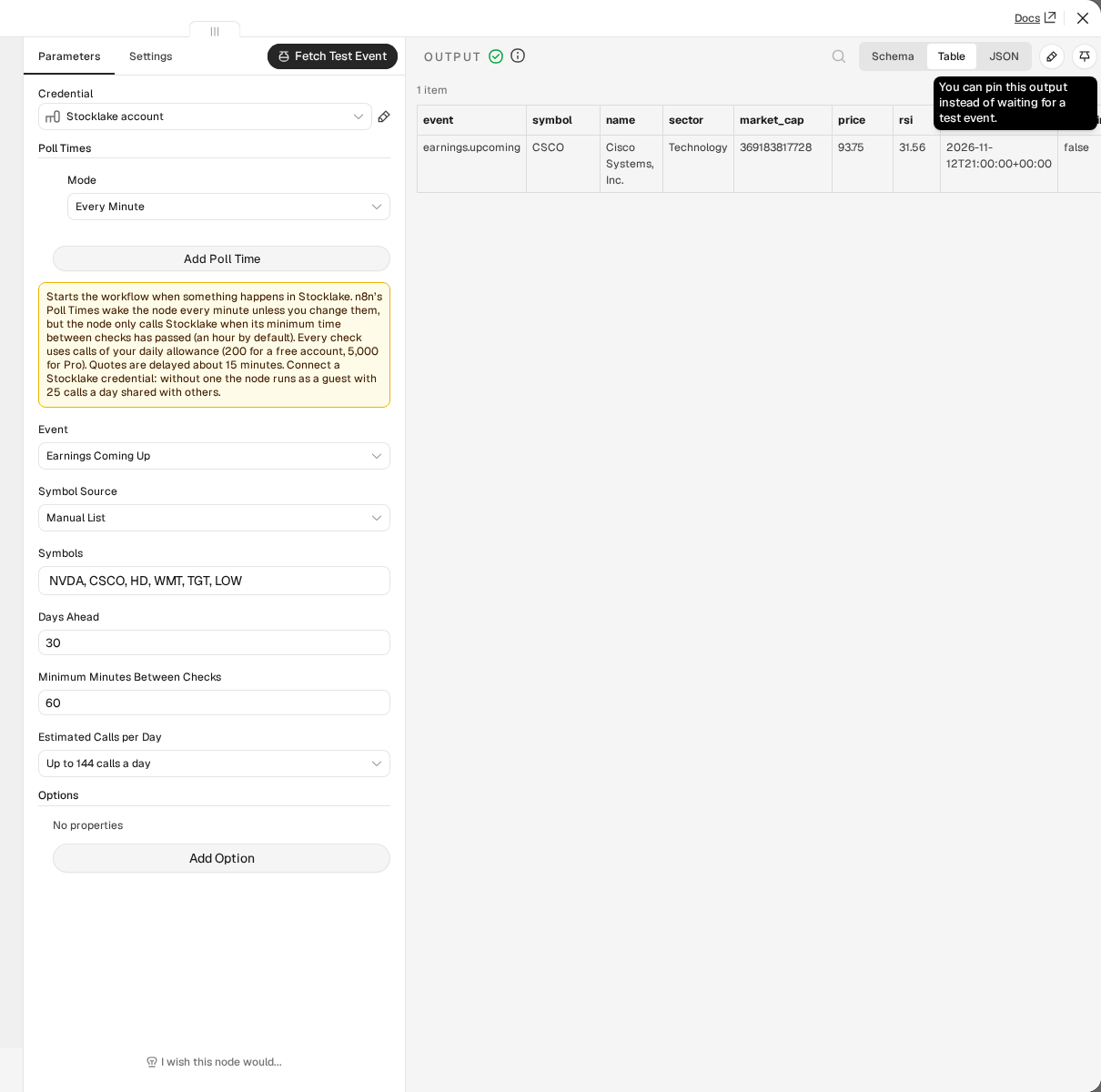
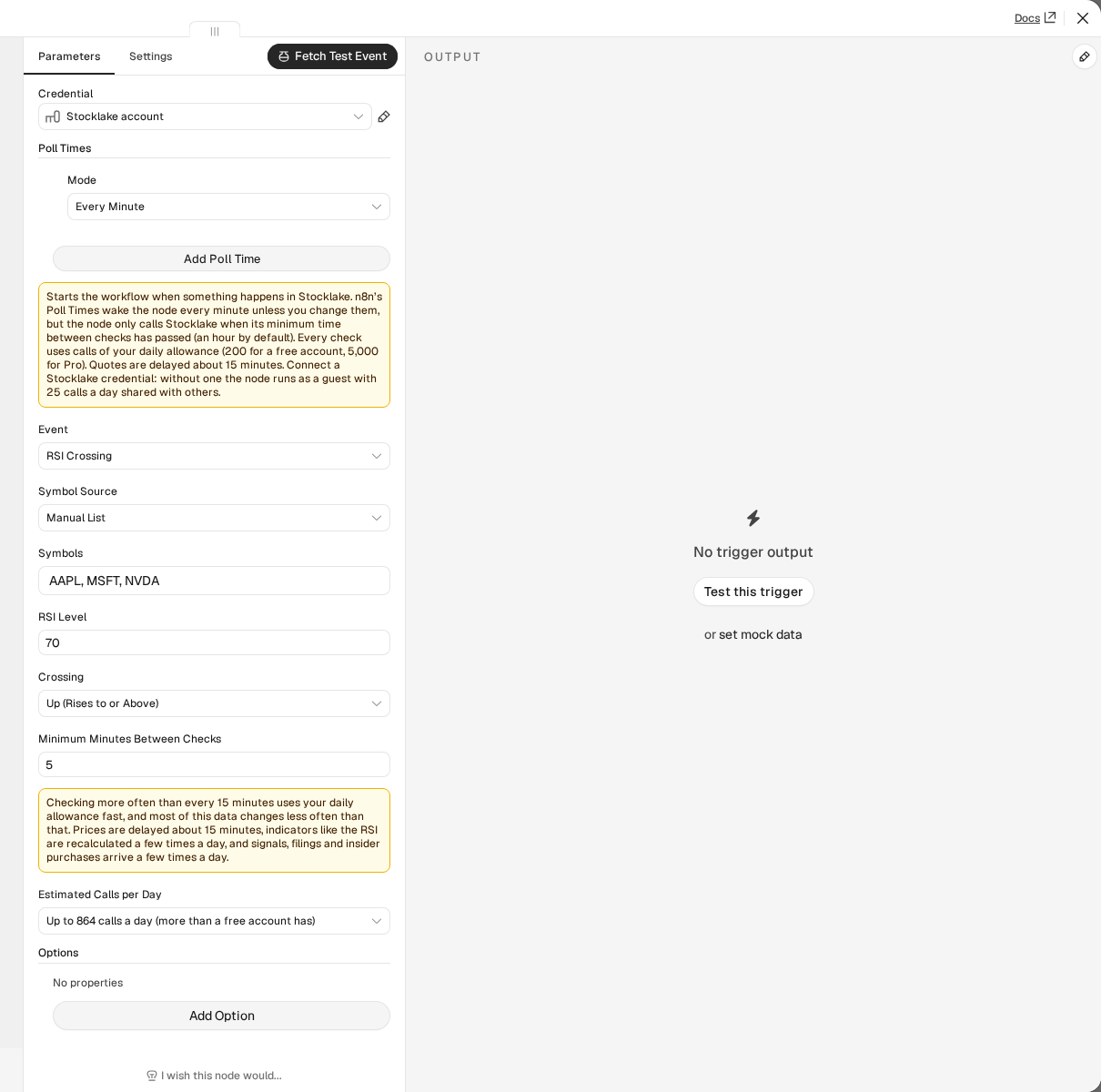
!Stocklake Trigger: Earnings Coming Up, with a test event
| Event | Fires when | Reads | Plan |
|—|—|—|—|
| New Signal | Stocklake flags a signal, optionally only for one direction, above a score, or for chosen stocks | get_signals | Pro |
| Earnings Coming Up | one of your stocks reports within N days (1-30). Once for each report date; a date that moves fires again | getearningscalendar | Free |
| New SEC Filing | a new 8-K for one of your stocks, with title, headline and link (summaries on Pro) | getstockfilings | Free |
| Insider Purchase | an insider buys shares worth at least an amount (shares times price) | getinsideractivity | Free |
| RSI Crossing | a stock’s RSI goes from one side of a level to the other, up, down or either way | get_stocks | Free |
| Price Move | a stock is up or down by more than a percentage on the day, once per stock, day and direction | get_stocks | Free |
Every item has an event field (signal.new, earnings.upcoming, filing.new, insider.purchase, rsi.crossed, price.moved) next to the data of the event. An RSI item carries rsi, previousrsi, threshold and direction; a price item changepct, prevclose, direction and thresholdpct; an earnings item days_until.
Plans. Only New Signal needs Pro. Insider Purchase works with a free key, but a free key reads less: the 5 newest insider filings of the last 90 days per stock (buys and sales together), where Pro reads up to 50. For a stock with many filings a free key can therefore miss a purchase that newer filings push out of the five before the next check.
Symbols. Signals look at every stock unless you give a list; the other events take a Manual List or My Watchlist (Pro). Filings and insider purchases are read one request per stock, so they take at most 25 stocks; the others up to 100.
Fires once. The node remembers what it has sent in the workflow’s static data (the ids of the events, at most 500 to 2,000 depending on the list with the oldest dropped first, or the last RSI value per stock). The first check after you activate the workflow, or after you change the settings that decide what is asked for, only records the situation and starts nothing: a stock that is already above the RSI level, or a filing that is already there, is not news. Turn on Options → Fire on Existing Items to have that first check send what exists. A stock you add to the list later is recorded first and announced from its next event. n8n saves the static data when the node fires and when the workflow is activated, so after a restart the node may announce an RSI crossing again.
Crossing, not “is above”. An RSI of exactly the level counts as above. The node compares each stock with its value at the previous check, so a stock that stays above 70 fires once, when it gets there, not at every check. Checks run on the schedule, so a crossing that reverses between two checks is not seen. The RSI is recalculated a few times a day: checking more often finds nothing new.
Test mode. Fetch Test Event returns the latest event that matches right now (the newest signal or filing, the next report, the biggest move, a stock on the chosen side of the RSI level) without touching the saved state, so you can build the rest of the workflow. If nothing matches, the error says what to change to get a sample.
Calls and schedule. Every check uses calls of your daily allowance: a list tool counts one call per row it returns and every stock of a check counts at least one. n8n’s Poll Times start at every minute, so the node has its own Minimum Minutes Between Checks, 60 by default: it only calls Stocklake when that much time has passed since its last check, whatever the Poll Times are. Set both to check more often. Estimated Calls per Day shows the upper bound for the event, the stocks and the interval (a watchlist is one call per stock on it per check, and is read at most once an hour). Under 15 minutes the node warns. A check that fails after the workflow is running (a rejected key, a used-up allowance) waits for the interval and shows the error in an execution. A Pro event with a free key fails already when you activate the workflow: n8n shows the message on the workflow, tries five times (each try is one call of the free allowance) and then stops.
!Under 15 minutes between checks: the node warns and shows up to 864 calls a day
examples/earnings-and-rsi-alerts.workflow.json has two triggers (earnings in the next week, RSI above 70) that format a message for Slack or email.
Using Stocklake with an AI agent (version 2)
The node is usable as a tool: add it to an AI Agent’s tool input (it shows up as Stocklake Tool). Version 2 tunes it for models:
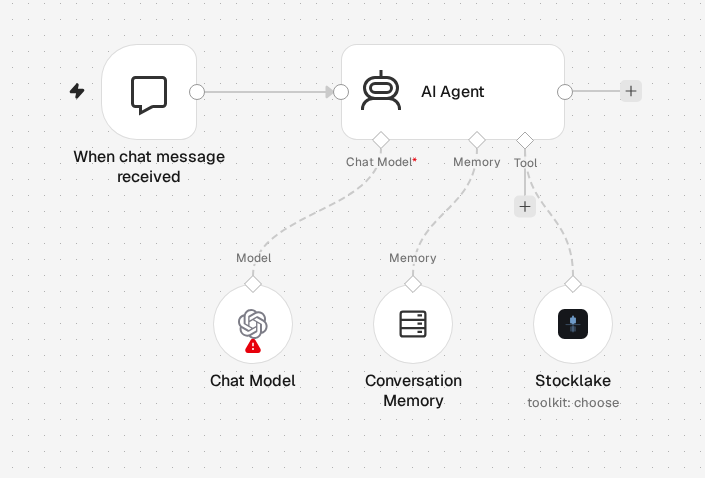
$fromAI() defaults. The fields an agent should fill in (ticker, days, limit, and for some operations a preset, sector, category or ranking) default to a $fromAI() expression, so nothing has to be wired by hand. Days and limit have a default, so the agent may leave them out; the ticker is required. Return All, Symbol Source and paging are hidden for a tool.!An AI agent with a chat model, memory and the Stocklake toolkit
A ready workflow is the AI agent template. The agent needs a chat model that supports tool calling. Toolkit descriptions are n8n expressions, so they need a current n8n.
Workflow templates
Five workflows in templates/, written for n8n’s template library. Paste a file onto an empty canvas (Ctrl+V). All five work with a free Stocklake account.
| Template | What it does |
|—|—|
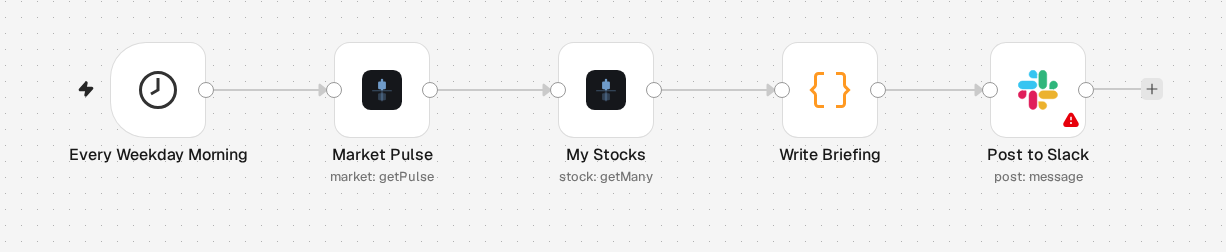
| Daily stock briefing to Slack | Every weekday morning: the market pulse (VIX, Fear & Greed, S&P 500) and your stocks in one Slack message |
| Earnings week alert by Gmail | The Earnings Coming Up trigger: an email once for each of your stocks that reports within 7 days |
| Oversold and overbought digest by email | The ten most oversold and the ten most overbought stocks, by email, each weekday evening |
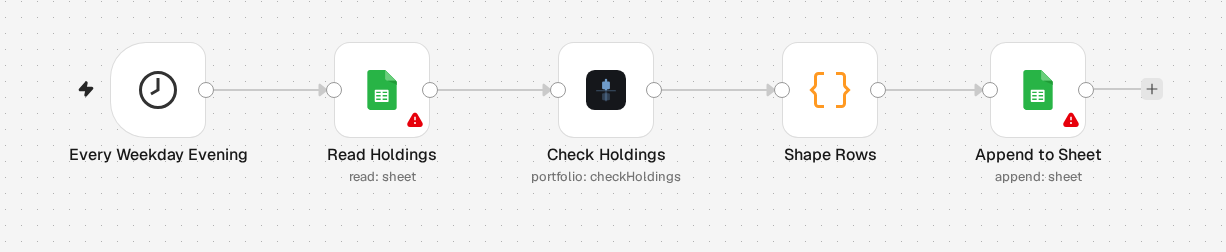
| Holdings check logged in Google Sheets | Reads your holdings from a sheet, values them with Check Holdings and appends one row per holding |
| AI agent with Stocklake tools | A chat agent that answers market questions with numbers from a filtered Stocklake toolkit |
!Holdings check: Google Sheets, Check Holdings, rows, Google Sheets
More small workflows are in examples/ (Compare, Snapshot, Check Holdings, an oversold digest, the toolkit agent, the trigger) and demo-workflows/.
Symbols from earlier steps (version 2)
Get Many and the Earnings Calendar have a Symbol Source:
{{ $json.ticker }}. The node reads it for every input item, works on all of them together in one run, and pairs each output row with the input item that supplied its ticker. A value can also be a comma-separated list.Whatever the source, the list is cleaned before anything is sent: trimmed, upper-cased and de-duplicated, with the first occurrence keeping its place. A value that cannot be a ticker does not fail the run. It comes out as its own item (valid: false with an error), paired with the input item it came from, and the other tickers still run. A ticker Stocklake does not know comes out the same way in Get Many (found: false with an error; it still counts as a call and is also listed in _meta.missing). Lists of more than 25 tickers are sent in batches of 25 and the rows come back in the order of the list (the Earnings Calendar keeps its date order).
Each ticker counts as one call toward your daily limit. When a run needs more than 25 calls, the node says so in the output panel before it starts, for example “About 60 calls against your daily allowance”. With Include Response Metadata on, meta also carries estimatedcalls, requests, invalidsymbols and duplicatesremoved.
Dropdowns that come from Stocklake (version 2)
Some fields that were typed or fixed lists in version 1 are filled from Stocklake when you open them, so they follow the API instead of drifting from it: Sector (Screener, Earnings, Sector), Preset (Screener; High Conviction is marked “(Pro)”), Source and Direction (Signal), Types (Stock → Get Activity), and the symbol picker, whose list also shows your watchlist (marked ★) when you open it with nothing typed.
CSV export (version 2)
Options → Download as CSV on the list operations (Get History, Get Indicator History, Screen Stocks, Compare, and the others that return rows) returns the rows as one binary CSV file (field data, change it with Put CSV in Field) instead of one item per row. The file has a header row, columns in the order they first appear, ISO dates as Stocklake sends them, a point as decimal separator, a UTF-8 byte order mark so Excel reads it correctly, and nested values as dotted columns (indicators.rsi). Text that a spreadsheet could run as a formula (starting with =, +, - or @, but not a number) gets a leading apostrophe. The file is named from the ticker, the operation and the day (AAPL-history-2026-11-06.csv); CSV File Name sets your own. The item holds fileName, rowCount and columns for the next node. With Compare, tickers that could not be read stay as separate items with their error next to the file. Without rows there is no file.
Limits and errors (version 2)
Request Options (on every operation) control how the node talks to Stocklake:
| Option | Default | What it does |
|—|—|—|
| Max Retries | 3 | How often a call is retried when Stocklake answers 429 (too many requests). The node waits as long as Retry-After says, or 1, 2, 4 seconds and so on; a wait longer than 30 seconds is not retried. |
| Timeout | 30000 ms | How long one request may take. |
| Include Remaining Calls | off | Adds _stocklake.remainingCalls (and dailyLimit) to every item, as Stocklake reports them, so a workflow can branch before the allowance runs out. The figure can be a call or two above the true one. |
A used-up daily allowance is never retried. The node stops with “Daily limit reached … Resets at 00:00 UTC” and, in the same run, makes no further request. A request that costs more than the calls left (a long symbol list) is refused with the number left; send fewer symbols.
Every failure is a node error whose description says what to do: which plan an operation needs, which symbol was not found, the accepted values the API lists for an invalid argument, whether a timeout or an unreachable server is the cause. With Continue On Fail a failed item becomes { "error": "...", "errorDescription": "..." } (plus httpCode for an HTTP failure) paired with its input item; a failure in a run over the whole input (From input items, From my watchlist) is paired with all of them.
When a free or guest credential gets a response with fields left out, the node adds an execution hint to the output (“Rating and AI fields need Pro” or the API’s own note on what the plan leaves out), once per run.
How it talks to Stocklake
The nodes call Stocklake’s MCP endpoint, which is Stocklake’s only public API (there is no separate REST API). It is the same endpoint Claude and ChatGPT use, documented at api.stocklake.dev/llms.txt and stocklake.dev/docs. Every parameter of the node maps onto a parameter of one tool there, with the defaults, limits and plan gating the tool has. The package has no runtime dependencies. The notes for n8n’s reviewers are in docs/resubmission.md.
Development
See CONTRIBUTING.md for building, testing, and trying the node in a local n8n.
Compatibility
Tested with n8n 2.x and the Streamable HTTP transport of Stocklake’s endpoint. Requires Node.js 20.15 or later.
Resources
Stocklake data is information, not financial advice.