Description
n8n-nodes-dmn
This is an n8n community node that provides DMN (Decision Model and Notation) decision table functionality following the DMN 1.3 specification.
This node is inspired by Dmsrdnv's n8n-nodes-dmn work, but uses a slightly different design approach (one in- and output) and functions without external dependencies.
Features
- DMN 1.3 Compliant: Implements decision tables following the DMN 1.3 specification
- Multiple Hit Policies: Supports UNIQUE, FIRST, PRIORITY, ANY, COLLECT, RULE_ORDER, and OUTPUT_ORDER
- Aggregation Functions: For COLLECT hit policy, supports SUM, COUNT, MIN, MAX aggregations
- FEEL Expressions: Basic support for FEEL-like expressions in conditions
- Type Safety: Automatic type conversion based on column definitions
- Debugging Support: Optional metadata and execution trace for debugging
Screenshot
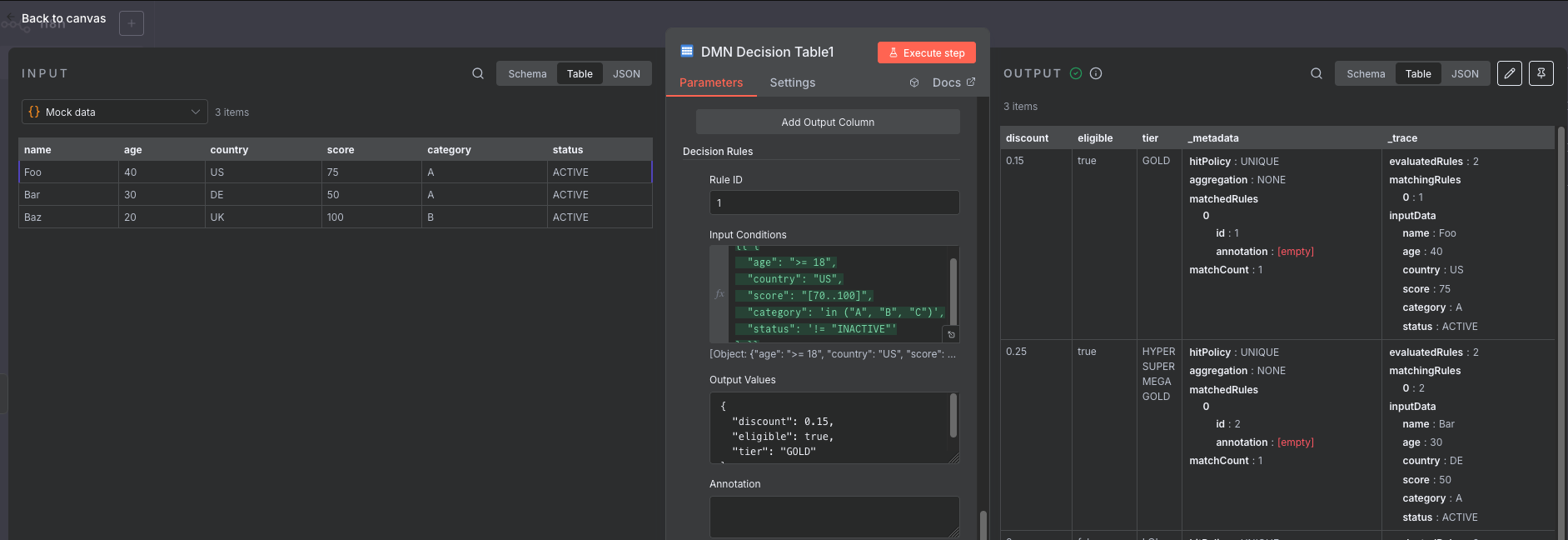
Installation
Community Node (recommended)
- Open your n8n instance
- Go to Settings > Community Nodes
- Search for
@that-one-tom/n8n-nodes-dmn - Click Install
Manual Installation
# Navigate to your n8n custom nodes folder
cd ~/.n8n/nodes

# Clone this repository
git clone https://github.com/that-one-tom/n8n-nodes-dmn.git

# Install dependencies
cd n8n-nodes-dmn
npm install

# Build the node
npm run build

# Restart n8n
Usage
Basic Decision Table
The DMN node allows you to create and evaluate decision tables. Here's a simple example:
Input Columns
age(number)country(string)
Output Columns
discount(number)eligible(boolean)
Rules
| Rule | Age | Country | Discount | Eligible |
|---|---|---|---|---|
| 1 | >= 65 | US | 0.2 | true |
| 2 | >= 18 | US | 0.1 | true |
| 3 | < 18 | – | 0 | false |
Configuration
-
Operation: Choose between:
Evaluate: Evaluate input items against the decision tableBuild Table: Output the decision table configuration
-
Hit Policy: Select how to handle multiple matching rules:
UNIQUE: Only one rule can matchFIRST: Return the first matching rulePRIORITY: Return the highest priority matchANY: All matches must have the same outputCOLLECT: Return all matchesRULE_ORDER: Return matches in rule orderOUTPUT_ORDER: Return matches sorted by output
-
Input Columns: Define the input columns with:
- Name
- Data type (string, number, boolean, date)
- Optional FEEL expression for transformation
-
Output Columns: Define the output columns with:
- Name
- Data type
- Optional default value
-
Decision Rules: Define rules with:
- Rule ID
- Priority (for PRIORITY hit policy)
- Input conditions (JSON format)
- Output values (JSON format)
- Optional annotation
Condition Syntax
The node supports FEEL-like expressions for conditions:
- Comparison:
> 18,<= 100,= "US" - Range:
[18..65](between 18 and 65) - List:
in ("US", "CA", "UK") - Negation:
!= "EXCLUDED",not in ("A", "B") - Any value:
-(matches any value)
Example Conditions JSON
{
  "age": ">= 18",
  "country": "US",
  "score": "[70..100]",
  "category": "in (\"A\", \"B\", \"C\")",
  "status": "!= \"INACTIVE\""
}
Example Output JSON
{
  "discount": 0.15,
  "eligible": true,
  "tier": "GOLD"
}
Advanced Features
Options
- Strict Mode: Fail if no rules match (otherwise returns defaults)
- Include Metadata: Add metadata about matched rules to output
- Trace Execution: Include detailed execution trace for debugging
Aggregation (COLLECT Hit Policy)
When using COLLECT hit policy with aggregation:
SUM: Sum of all numeric outputsCOUNT: Count of matching rulesMIN: Minimum numeric valueMAX: Maximum numeric value
Development
# Install dependencies
npm install

# Build the node
npm run build

# Run in development mode (watch for changes)
npm run dev

# Run linter
npm run lint

# Format code
npm run format
Examples
Customer Discount Rules
{
  "inputColumns": [
    {"name": "customerType", "type": "string"},
    {"name": "orderTotal", "type": "number"},
    {"name": "loyaltyYears", "type": "number"}
  ],
  "outputColumns": [
    {"name": "discountPercent", "type": "number", "defaultValue": 0},
    {"name": "freeShipping", "type": "boolean", "defaultValue": false}
  ],
  "rules": [
    {
      "conditions": {
        "customerType": "PREMIUM",
        "orderTotal": ">= 100",
        "loyaltyYears": ">= 5"
      },
      "outputs": {
        "discountPercent": 20,
        "freeShipping": true
      }
    },
    {
      "conditions": {
        "customerType": "PREMIUM",
        "orderTotal": ">= 50"
      },
      "outputs": {
        "discountPercent": 15,
        "freeShipping": true
      }
    },
    {
      "conditions": {
        "customerType": "STANDARD",
        "orderTotal": ">= 100"
      },
      "outputs": {
        "discountPercent": 10,
        "freeShipping": true
      }
    }
  ]
}
License
MIT
Support
For bugs and feature requests, please create an issue on GitHub.
Contributing
Contributions are welcome! Please feel free to submit a Pull Request.
Acknowledgments
This node implements the DMN 1.3 specification for decision tables. For more information about DMN, visit the OMG DMN Specification.